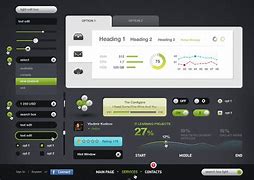
User Interface (UI) defines the way humans interact with the information systems. In Layman’s term, User Interface (UI) is a series of pages, screens, buttons, forms and other visual elements that are used to interact with the device. Every app and every website has a user interface. User Interface (UI) Design is the creation of graphics, illustrations, and use of photographic artwork and typography to enhance the display and layout of a digital product within its various device views. Interface elements consist of input controls (buttons, drop-down menus, data fields), navigational components (search fields, slider, icons, tags), informational components (progress bars, notifications, message boxes).
The only user interface on early computers was a few buttons at the operator’s console. Many of these early computers relied heavily on punched cards that were created using keypunch machines to input data and programs. Some voting machines still employ a punched card technology even though they are virtually obsolete in computers as of 2012 (punched cards).
With the advent of the command line interface, which at first took the form of a largely blank display screen with a line for user input, the user interface underwent an evolution. Users navigated information exchanges with the computer using a keyboard and a series of commands. This command line interface gave way to one where menus (lists of options with text descriptions) became the norm.

Types of User Interface (UI)

A good user interface (UI) focuses on making user’s interactions simple and efficient. User would appreciate a website with intuitive user interface that leads them towards their task in most engaging way. User Interface (UI) design focuses on thinking of a user, what they might need to do when they visit website and ensure that the interface has elements that are easy to access and understand. Being a UI designer, one need to understand the goals, skills, preferences and tendencies of the user to make a better interface.

Importance of User Interface (UI)
As the User Interface can make or break the incoming users, it’s important to take care of below points when designing a UI:
Advantages of User Interface (UI)
Some advantages of User Interface are mentioned below:

Disadvantages of User Interface(UI)
Some disadvantages of User Interface are listed below:
What is UX
UX stands for User Experience. UX design is all about creating experiences (in the form of products and services) that solve problems for users.
The term “UX” was invented by Donald Norman, a cognitive psychologist who started working at Apple in the early 1990s. He took on the role of User Experience Architect, making him the first (known) person in history to have UX in their job title.
Explaining the origins of UX, Donald Norman said:
“I invented the term because I thought human interface and usability were too narrow. I wanted to cover all aspects of the person’s experience with a system, including industrial design, graphics, the interface, the physical interaction and the manual.”
In this video, Donald Norman explains in more detail what he meant when he came up with the term — and how it tends to be misused today. Most importantly, he emphasizes that UX doesn’t just encompass the design of a product or the product itself; it covers everything surrounding the product that impacts how the user experiences it.

UX is important because it directly impacts the relationship between a company and its customers.
If you have a positive experience with a product or service, you’re more likely to use it again and become a loyal customer. You might even recommend it to friends and family. That’s great for the brand reputation, which ultimately determines whether or not the product or service is successful and profitable.
On the flip side, a negative user experience leaves a bad impression of the product, service or brand. If it’s less than satisfactory, you’ll be inclined to go elsewhere, like a competitor with better UX.
Wherever there are two similar products or services offering the same functionality, the one with the best UX will always win out. UX is therefore crucial for winning and keeping customers, developing a positive brand reputation and, ultimately, for driving profit and business growth.
We compiled some interesting statistics about the business value of UX, like the fact that 66% of customers are willing to pay more for a great user experience. We also covered in more detail about the human value of good UX and how it plays an important role in ensuring that products and services are not only enjoyable to use, but are as inclusive and accessible for as many people as possible.

If UX describes the quality of a user’s encounter with a particular product or service, UX design is the process of creating and shaping these experiences, with the goal of making them positive, pleasant and valuable for the end user.
UX design isn’t about how a product looks; that’s just one aspect of the overall user experience. It’s more about ensuring that the product is logical, functional, easy to navigate and generally user-friendly.

There are 5 elements of UX design to consider:
The UX design process focuses on identifying and solving a problem for a specific target audience. It includes:
UX stands for “user experience” and it basically describes how a user feels when they use a product or service. A good user experience is easy and enjoyable, while a bad user experience is complicated, confusing and frustrating.
UX design is the process of designing these experiences. It involves identifying and understanding a specific user problem and designing products or services to address the problem in a way that centers the user.
The type of user experiences a brand or company provides has a big impact on whether or not customers return—and whether or not they would recommend a product or service to their friends. Ultimately, UX determines whether or not a brand is successful.
That’s UX design in a nutshell.

THE UX DESIGN PROCESS
The UX design process is the structure we use to help identify and solve those problems.
For example, a common problem among your target audience might be that they struggle to stay on top of their monthly budget. You’d go through the UX design process to understand what kind of solution they might need in order to address the problem, to come up with ideas, design and test them, and eventually, build them into a live product (e.g. a smart budgeting app).

The UX process ensures we’re building products that people actually want to use. It gives the whole team a clear vision for the product and it ensures that the end users’ needs are being considered every step of the way.
So: What does the UX design process look like and what are the steps involved?
The following steps can take you all the way from an idea to a product launch:
Note that these steps don’t always take place in a strictly linear fashion. You might get to the prototyping stage, only to find that your initial idea is flawed or that it doesn’t actually solve the user problem.

With those insights, you might go back to the design stage to come up with a new solution, or even to the problem definition stage to assess whether you’re focusing on the most important user challenge.
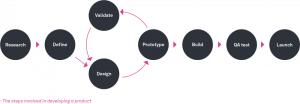
The UX process is everything that happens before a design is sent to developers to be built. It makes up the first few steps from research to prototyping.
A simplified version of the UX design process might also look like this:
That’s the UX design process in a nutshell. Now let’s take a closer look at what happens at each stage.

What happens at each stage of the UX design process?
Research and problem definition.
The UX design process begins with user research. This involves speaking to or observing real users (or people who represent your target users) to figure out what problems they have and what they desire and require from a solution.
User research can be qualitative (which involves learning about users’ thoughts, feelings and opinions) or quantitative (which looks at measurable data such as how many times a user clicks on a certain button or how long it takes them to complete a particular task).

Some common UX research methods include user interviews, surveys, A/B tests, card sorting, first-click tests and eye-tracking. The research stage can also involve researching competitors to see what’s already on the market.
Once you’ve conducted user research, the next step is to analyze your findings and synthesize the results into meaningful, actionable insights. You’ll then present your UX research findings to key stakeholders.
During the research phase, UX designers use a variety of different tools depending on their chosen research methods. You will learn about the most popular UX research tools and how they’re used later in the course.
Based on the findings of your UX research, you’ll then identify the most pressing user problem that needs to be solved. This is known as the problem definition stage, and it usually involves crafting a problem statement — a short summary of the problem you’re going to design a solution for.
To help you come up with ideas for how to solve your user problem, you might turn your problem statement into a series of How might we? questions. The “How Might We?” format reframes the problem in a way that invites solutions.
For example: “How might we make it easier for 25–35-year-olds to manage their monthly budget?” or “How might we improve the budgeting feature in our app to make it easier for 25–35-year-olds to see their monthly expenditure?”
Once you have a clear grasp on the problem you’re trying to solve, and the people you’re solving it for, you can move on to the next stage in the UX design process.

Design
The design stage is where you come up with potential solutions to your user problem. Here you choose one solution that is most feasible and most likely to meet the users’ needs and then you start to bring it to life by designing it.
Let’s imagine that the solution you’ve decided to pursue is a budgeting feature that you’ll add to an existing app. The design phase might include sketching out initial ideas for how the new feature will work, considering things like what functionality it will provide, where it’ll sit in the app and how the user will get to it.

With the initial ideas sketched out, you’ll then consider the information architecture of the new feature (i.e. how it will be structured and organized in terms of content and information) and map out user flows. A user flow is a chart or diagram which depicts the path a user will take to complete a certain task. So, for your new feature, you might create user flows to determine how the user will complete tasks such as assigning a category to an outgoing transaction (e.g. household, travel, entertainment, fitness, groceries and so on) or accessing the monthly breakdown of their spending.
From there, you’ll create wireframes to further firm up the design of your new feature. Wireframes can be created by hand (very low-fidelity wireframes) or digitally using a variety of wireframing tools.

Prototype
Having laid out the blueprint for your new product or feature, the next step is to fine-tune the details of the design and create a more lifelike model of how the product will look and function. This is done during the prototyping phase.
A prototype is a simulation that shows how users will interact with the finished product. Prototypes can be interactive and clickable, allowing stakeholders (and sample users) to interact with them as if they’re a live product.
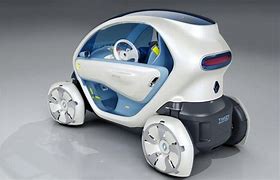
The purpose of prototyping is to give you something to test before you spend time and money developing your design into a living and breathing product. It enables you to make sure that the solution you’ve come up with is user-friendly and accessible. It also ensures that users are able to interact with it in the way you originally intended.
Validate
The validation stage is all about testing your designs to make sure they’re effectively solving the user problem and that they’re a joy to interact with.
This step in the process requires UX (or usability testing) on real or representative users. It’s absolutely critical as it gives you the chance to identify problems with your designs and fix them before you go to development, ultimately saving you time, money and disgruntled users.

Essentially, UX testing allows you to validate or invalidate your designs, determining whether you move forward to the development stage or return to the design stage to make adjustments.
As you can see, each step in the UX design process is geared towards ensuring that the products you create are beneficial to your end users and built with their needs in mind. That’s the key to good UX and you can’t create successful products otherwise.
How do different roles fit into the UX design process?
UX is a team sport. Different people are required at different stages. It’s fluid. It’s collaborative. And it changes to suit the needs of the business.

Here’s where different UX roles fit into the process:
Specialists like researchers and content experts are commonly employed where UX is integral to the operation. This could be anywhere from HubSpot to NHS Digital.
In smaller companies with limited resources, it’s normal to have generalists that work across the process.

What happens if I skip steps in the UX design process?
As UX mentor James O’Brien explains:
Each step in the lifecycle builds on the previous one. Skipping steps will lead to less-than-ideal outcomes.
Cutting corners takes you away from the user. So why do UX professionals skip steps in the first place?
Businesspeople sometimes want to prioritize business needs over users. Your boss may argue that user research is “too expensive”. This isn’t true.
James warns that, when working in UX, you may have a boss or colleague that wants to do a “quick” version of UX:
They want to skip research and just go to what they understand as design. Have a conversation that begins with ‘here’s what I need to do in order to get it right’. See if you can get their buy-in.

If you skip certain steps in the UX design process, you risk missing out on the true value that good UX brings. The business value of UX design is well-documented; you’ve probably read the much-cited statistic that, on average, every $1 invested in UX brings a return of $100.
The value of UX (and the value of following the UX design process) boils down to creating products and services that people actually need and want to use. That translates into customer loyalty, higher conversion rates, increased sales and revenue and a competitive edge in your market.
As a general rule, follow the process as closely as possible. It’s what separates excellent products from average ones.

One way to measure the value of UX design is to consider the business impact. There is a wealth of compelling data out there, so let’s review some of the most impressive hard numbers.
From these stats, it’s clear that the value of UX design is directly reflected in key business metrics. Ultimately, the business value of UX design translates into:
Another notable way in which UX design brings value is that it keeps you focused on the right people (your customers) and on designing the right solutions. The UX design process centres on conducting user research in order to understand who your users are, what problems they face and what they require in terms of a viable solution.

From there, it encourages testing and gathering feedback in order to improve designs before developing them into fully-fledged products. In addition to fostering a user-first culture, this helps to reduce development costs. Research has found that the cost of correcting a mistake after a product goes to market is between four and five times more expensive than identifying and fixing an issue discovered during the design phase.
Those are the benefits of investing in UX. But what happens when companies neglect to take UX design seriously? We’ve got some data on that too.
Investing in UX design is good for business. Conversely, there are major consequences of not prioritising the user experience. Here’s what happens when companies don’t invest in UX design:
As you can see, overlooking the value of UX design is not a smart move. Now let’s dive deeper into the value of UX design with some case studies.

The value of UX design is evident in the success of brands and companies who not only prioritise UX but do it exceptionally well.
Consider Airbnb, the most famous platform for holiday home rentals. At one point, Airbnb was what you might call a failing startup, with low revenue and zero growth.
However, once the founders stopped fixating on creating something scalable and focused instead on creating a great user experience, they were able to transform their faltering business into one of the most successful companies in the world.

Airbnb co-founder Joe Gebbia explains how an experience he had at design school influenced his approach to building a successful product:
“If we were working on a medical device, we would go talk with all of the stakeholders, all of the users of that product, the doctors, nurses, patients… We’d have the device applied to us, and we would sit there and feel exactly what it felt like to be the patient, and it was in that moment where you start to go ‘aha, that’s really uncomfortable. There’s probably a better way to do this.”
Now, any newcomers who join the Airbnb team take an all-expenses-paid trip in their first or second week on the job so they can experience the product from the user’s perspective. UX is at the heart of everything Airbnb does and the company has achieved huge success as a result. That’s the value of UX design in action.

Back in 2014, Virgin America (now part of Alaska Airlines) set out to revamp the entire user experience of booking flights on their website. They created the world’s first ever responsive airline website, with the goal of catering much more effectively to the needs of modern-day travellers.
In a bid to improve the user experience, they redesigned their website to incorporate full-screen, single scroll booking and opted to present the user with just one decision at a time. They simplified and decluttered the entire process and their efforts well and truly paid off.
For Virgin America, the value of UX design translated into a 14% increase in conversion rate and a 20% decrease in the number of customer support calls needed. And, thanks to the redesign, users were able to book their flights almost twice as fast as before.

Airbnb and Virgin America are just two examples of many brands who have profited from the value of UX design. And for every positive case study, there are sadly even more companies who have suffered the consequences of delivering a bad user experience.
Below you can read about some of the most regrettable UX choices that cost companies millions.
Everyone makes mistakes, and big businesses and companies are no exception. From no slippery floor warnings that lead to injuries to user harmless bad website design that often cost a business million, user experience mistakes are frequent and numerous.
Today, we are bringing you bad user experience choices that companies have made that resulted in heavy loses, so let’s get to it.
Let’s get this out of the way first. UX, despite being frequently used in web design, isn’t exclusive to it. It refers to the overall experience of a person who uses a product or service, no matter if it’s a product they purchased online, bad design of an app or platform they used, pretty much anything.
Bad user experience frustrates users and often makes them never come back again, so when a big company or platform makes a bad UX choice, they often lose money in the form of people stopping to use their services.
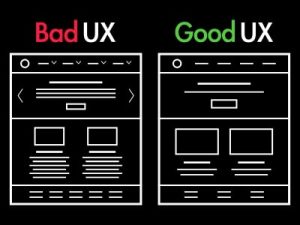
Here are a few examples of bad web design UX that we can all agree are frustrating:
Honestly, all of these will make me close a website almost immediately, so bad UX choices can be a big loss especially when it comes to smaller businesses. But large companies aren’t immune.
Let’s look at some examples.
Walmart, the all-around known retail giant with over 11 thousand stores worldwide. It has existed since 1962 so naturally, everyone would think they already made all the possible mistakes decades ago. That’s where we’re wrong.
In 2009, Walmart asked its customers a simple question: ‘Would you like Walmart to be less cluttered?’ and people responded with an even simpler ‘yes’. Walmart then spent hundreds of millions removing excess inventory from their stores, clearing aisles and shortening their shelves.
It makes sense that everyone would enjoy a supermarket where there’s more space, doesn’t it? Only they didn’t.
Despite Walmart removing only 15% of their inventory, sales plummeted, resulting in a $1.85 billion loss. The team that was responsible for this project got fired, and Walmart has since been trying to restore its old ‘cluttered’ look.

You might wonder, why was this a mistake on their part, if they asked their customers what they wanted and ran a survey looking for feedback.
The problem was the question itself, they already provided an answer, and instead of asking the customers what they wanted, they asked them if they agreed.

They could have asked ‘what do you think would make Walmart easier to navigate’ or ‘what do you think would improve the user experience’. In a way, they ignored the customer’s needs and showed that what the customers wanted didn’t matter.
If you run a survey for your business, don’t do it as Walmart did.
Digg was a popular social bookmarking website with an upvote system that decided to switch to social networking, because of the rise of Facebook and Twitter. Their aim was to make it easier to follow people and share content, but all they did was ruin their website and lose all of their users.
People with large amounts of friends started receiving the most upvotes, not because what they posted was quality, but only because they had hundreds of friends. As an attempt to stop this, Digg disabled their messaging feature, which did not make their users happy (at all).
In 2010, they redesigned their site and removed a number of features, which drove a large number of their userbase to Reddit. Valued at $160 million in 2008, it was sold for $500.000 in 2012.
This icon website had the same design for a long time, where people could request icons and users would vote, so the most popular requests would get drawn.
After a redesign where they added new features and replaced the old design, making it minimalist and modern, they noticed a 50% drop in user engagement for requested icons and 50% drop in user engagement for votes.
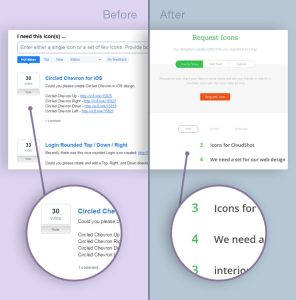
By making the site simpler, they accidentally made it difficult for people to see the vote and request button. The arrows to upvote and downvote a request appeared only if you hovered over the number of votes, which was a big mistake, because people just weren’t noticing it.
It turned out that their old interface, despite looking outdated and not modern, was much more user-friendly.
Mark & Spencer are a huge British retail company founded back in 1884.
They spent £150 million on a new website that, at least at first glance, looked really good. It had stunning photographs and a simple enough design, but this article isn’t about things that went well for companies.
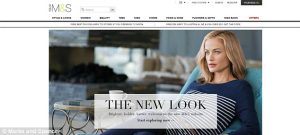
People started complaining almost immediately: they had to create new accounts on the website, passwords couldn’t be reset, the tablet version of the website was hard to navigate, the website was crashing, and there wasn’t enough information about the products.
Their sales plummeted by 8.1%, a £55 million loss.
CNN had the same website design for years, until 2015, when they introduced a new website design.
Just like all the other examples in this article, the new design was clean, modern, and beautiful, opposite of the old more cluttered one. But people didn’t like it.

It had a much slower loading time than the old one, a whopping 20 seconds, all because of all the large images on the website. The images took up the majority of space, so people couldn’t see the headlines and were forced to scroll down a lot. The new design displayed half as many clickable stories in the same space, and took 20% of the CPU to load the home page in.
The value of UX design doesn’t only apply to businesses. It also has a major impact on the end users — people like you and I who engage with different products and services every day.
If you think on a very large scale, UX design influences whether we have enjoyable, easy, efficient experiences or entirely negative ones. It determines what solutions are available to us and the kind of access we have to those solutions.

In some cases, bad UX can be frustrating — for instance, if you want to buy something online but the website you’re using is infuriatingly difficult to navigate. In other cases, bad UX can be incredibly distressing. Consider the scenario of having to go into hospital for treatment and finding that every aspect of the experience is poorly designed. This could become a real source of anguish in your life.
Then there’s the matter of inclusivity and accessibility. UX design determines whether or not products are accessible to and inclusive of all users, regardless of who they are and what different needs, requirements and disabilities they may have.
The value of UX isn’t just about creating nice websites and boosting a company’s revenue. It’s about designing a world which is enjoyable, inclusive, accessible and usable for everybody.
It’s impossible to overstate the value of UX design. From a business perspective, prioritizing the user experience results in happier customers who remain loyal over time. This in turn achieves higher conversion rates and increased revenue, lower development costs and an overall stronger, more competitive brand.
From a human perspective, the value of UX design can be felt in how we experience the world around us. It gives us solutions to everyday problems and ensures those solutions are enjoyable, user-friendly, and, most importantly, accessible and inclusive.
Difference Between User Interface(UI) and User Experience(UX)
| User Interface(UI) | User Experience(UX) |
| UI focuses on the quality of the user’s contact with the product | UX centers around the intent and functionality of the product. |
| UI comprises more creative design elements linked to the look and feel of the user’s experience | UX involves components like market research and understanding consumer needs. |
| UI is more particularly focused on the design of the end product | UX are concerned with managing the overall project from ideation through development and delivery |

Not a member yet? Register now
Are you a member? Login now